Your POS tells you who bought.Atlas tells you who walked out.
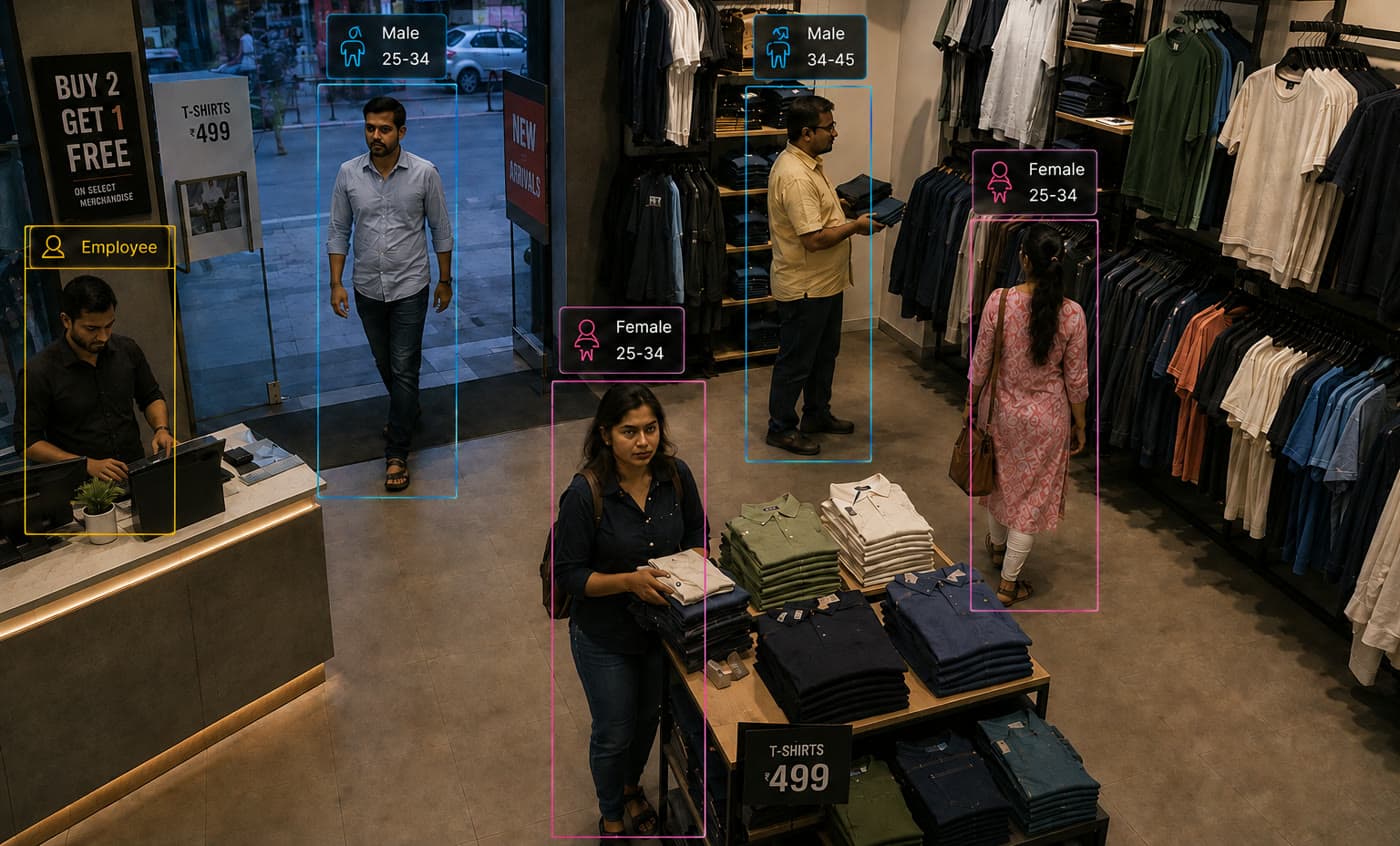 Illustrative scene · Store entrance
Walk-ins since 18:00
214
Sample alerts · Store 14, Saturday
- 214 walk-ins · 58% women · 25–34 leadsFootfall
Quasi Retail turns the CCTV you already own into a live picture of your store: who walked in, where they went, how long they waited and how your staff responded. Footfall, queues, dwell, conversion and staff coverage, with no new hardware.
Counts and alerts only. No faces stored, no identities.
Why teams run Atlas
Your cameras already see every customer. Now they count, understand and act.
Conversion you can finally measure.
Footfall against bills, by hour and by section. You see the Saturday-evening rush that left without buying, and the counter that was short-staffed when it did.
Know who is walking in.
Gender and age mix per store, per hour, per campaign. Stock, staffing and promotions planned on the customers you actually get.
Staff where the customers are.
Live staff-to-customer ratio per zone, idle counters, and response time to an unattended customer. Rosters built on measured peaks.
- New cameras. Runs on the CCTV you have
- 0
- Queue and service alerts to the floor in seconds
- Real-time
- Counted, not sampled: entry, zone and exit
- Every visitor
- From camera access to your first store report
- <1 week
From the field
Every day ends with a store report.
Footfall by hour, who your customers are, peak queues and staff on the floor, set against your POS. Floor alerts reach your team on WhatsApp in seconds.

Store 14Sat 29 Aug · 10:00–21:30
Conversion 22.4%
- Walk-ins
- 1,486
- Women · men
- 57% · 43%
- Conversion
- 22.4%
- Avg dwell, gold section
- 6.2 min
| Hour | Walk-ins | Leading age group | Peak queue | Staff on floor | Note |
|---|---|---|---|---|---|
| 12–13 | 128 | 35–44 · 38% | 3 · 1.5 min | 6 | Steady |
| 18–19 | 214 | 25–34 · 41% | 9 · 7 min | 5 | Under-staffed at peak |
| 20–21 | 96 | 25–34 · 36% | 2 · 1 min | 7 | Over-staffed |
Swipe the table for more
 Quasi Retail
- Today
- Customer unattended · 4 minGold section · display 2 · Cam 04Nearest associate alerted6:39 PM
- Billing queue alert9 waiting at 2 open countersEst. wait 7 min · threshold 6Open counter 3 · manager paged6:42 PM
How it works
From your cameras to your first store report in a week.
Connect
We plug into your existing CCTV: NVR, DVR or IP streams. Entrance, aisles, counters, tables. No new cameras, no rewiring.
See
The AI counts every visitor, estimates gender and age band, follows them zone to zone, and tells staff from customers.
Act
A queue builds, a customer waits unattended, a counter sits idle: the floor manager gets it on WhatsApp or the console in seconds.
Decide
Daily and weekly store reports: footfall by hour, who your customers are, conversion and staff coverage, against your POS.
- Cameras
- Existing NVR / DVRIP streams
- Alerts and data
- WhatsAppSMSEmailPOS / ERPREST API
What it sees
What it measures on your floor.
The AI counts every visitor, estimates gender and age band, follows them zone to zone, and tells staff from customers, without storing a single face.
- Footfall counting
- Gender split
- Age groups
- Groups & families
- Queue length & wait time
- Zone heatmaps
- Dwell time per display
- Walk-in to bill conversion
- Staff-to-customer ratio
- Associate response time
- Idle & phone-use detection
- Table turnover
- Shelf & display attention
- Loitering & after-hours intrusion
- Guard-at-post detection
- Hair cap, gloves & uniform compliance
- Peak-hour forecast
+ metrics we train on your store
Your rules
From signal to floor action, on thresholds you set.
Each signal becomes an alert in seconds, and a record you can manage the store on.
| Signal | What Atlas sees | Alert | What gets recorded |
|---|---|---|---|
| Queue | More than 6 waiting, wait over 4 min | Open counterPage manager | Queue length, wait and abandonments per counter |
| Service | Customer unattended over 3 min at a display | Nearest associateWhatsApp | Time to attend, by associate and zone |
| Compliance | Guard away from post, hair cap or gloves missing at the counter | SupervisorClip saved | Minutes off-post, violations per shift |
| Security | Loitering at a high-value display, after-hours entry | Security deskClip saved | Frame, zone and timestamp |
Your rules, per store, per zone, per hour. Change them from the console.
Where it runs
Built for every format.
Jewellery showrooms
Dwell per counter, unattended customers, families against solo walk-ins, loitering at high-value displays, and the guard confirmed at post.
Restaurants & QSR
Order-counter queues, table turnover, time to serve, and hair cap, glove and uniform compliance, ready for food-safety audits.
Fashion & apparel
Zone heatmaps, trial-room queues, gender and age mix by section, and which displays get looked at but never picked up.
Supermarkets & grocery
Checkout queues and open-lane recommendations, aisle traffic, shelf attention and empty-shelf detection on the aisles that sell.
Electronics & showrooms
Demo-unit dwell, associate engagement time, walk-ins never approached, and which brand walls draw which age groups.
Malls & multi-store chains
One console across every outlet: footfall league tables, store-against-store conversion and staffing benchmarks.
Do we need new cameras?
No. We plug into your existing CCTV: NVR, DVR or IP streams, at the entrance, aisles, counters and tables. No new cameras and no rewiring.
Does it store customers’ faces?
No. Quasi Retail keeps counts and alerts only. No faces are stored and no identities are kept. It is anonymous by design.
What does it measure?
Footfall, gender split, age groups, groups and families, queue length and wait time, zone heatmaps, dwell per display, walk-in to bill conversion, staff-to-customer ratio, associate response time and more, plus metrics we train on your store.
How do floor staff get alerts?
On WhatsApp or the console, in seconds, on thresholds you set per store, per zone and per hour.
Can it measure conversion?
Yes. Footfall is set against your bills by hour and by section, so you see walk-in to bill conversion and the rush that left without buying.
How soon do we see results?
Under a week from camera access to your first store report.
What does a pilot look like?
A pilot on one store: we connect to your existing cameras, calibrate on your entrances, counters and zones, and hand you the first daily report within the week. Then we switch on live alerts for your floor team. No new hardware and no long contracts.
Live pilot
See your own store the way Atlas sees it, in a week.
A pilot on one store: we connect to your existing cameras, calibrate on your entrances, counters and zones, and hand you the first daily report within the week. Then we switch on live alerts for your floor team. No new hardware and no long contracts.
- Your cameras
- Your zones
- Your POS
Part of Quasi Atlas.
Every product runs on one platform, one data layer and one console. Start with one and add the next when you are ready.